


Recent data shows the BPA market to reach $19.6B in 2026 from $9.8B in 2020. Why? Leaders are realizing that manual work comes with the cost of wasted time and slipped opportunities. Business automation allows humans to focus on aspects that require emotional intervention. It also helps SMBs serve their customers more effectively while scaling without hiring more people.
This guide explains business automation, how CRM helps with it and a simple implementation guide.
What is business automation?
How does business automation work?
Most business automation follows a simple sequence: a trigger starts the process, predefined rules determine what should happen next, and the system performs one or more actions automatically.
For example, when a prospect submits a demo request, the workflow can capture the contact in the CRM, check whether the company matches the target customer profile, assign the lead to the appropriate salesperson, create a follow-up task, and send the prospect an acknowledgement email.
The employee still makes the important sales decisions, but the repetitive steps around that decision no longer need to be completed manually.
This is what makes automation different from simply using software. A CRM may store customer information, but a CRM workflow can actively respond to that information and trigger the next step.
Automation can apply across departments: finance teams might automate accounts payable approvals, HR might automate onboarding tasks, and sales teams might automate lead follow-ups.
Types of business automation
Business automation can be applied to almost any repeatable process that follows a defined set of steps. The technology and level of human involvement may differ depending on the process.
Business process automation (BPA): Automates structured processes such as approvals, employee onboarding, invoicing, and document processing.
Workflow automation: Connects multiple steps, people, and systems so work moves automatically from one stage to another.
Robotic process automation (RPA): Uses software bots to perform repetitive, rule-based actions, particularly when existing systems do not communicate easily with one another.
CRM automation: Automates customer-facing processes such as lead assignment, follow-ups, pipeline updates, customer communication, and support workflows.
Marketing automation: Automates activities such as audience segmentation, email journeys, lead nurturing, and campaign triggers.
AI-powered automation: Uses AI to interpret information, identify patterns, summarize interactions, generate content, or recommend the next action within an automated workflow.
These categories can overlap. A single business process may use CRM automation, workflow automation, integrations, and AI together.
Role of CRM in business automation
A CRM becomes particularly useful for automation because it already contains information about prospects, customers, interactions, deals, activities, and lifecycle stages.This information can be used for automation to trigger the next action.
For example, a change in a customer's lifecycle stage can trigger a new task for an account manager. A new inbound lead can be routed according to territory. A missed follow-up can create a reminder automatically. A support issue can be escalated when it crosses a defined SLA.
The value is that information captured in one part of the customer journey can automatically initiate the next relevant step.
Automated lead nurturing
In 2026, we have moved into "Agentic AI" within CRMs. Instead of a sales rep manually checking which lead opened an email, the CRM uses lead scoring to assign points and naturally highlighting high-intent prospects.
The workflow: A prospect downloads a whitepaper -> CRM assigns points -> CRM triggers a personalized LinkedIn outreach -> Only when the lead is "hot" does it land on a human rep's calendar.
Seamless marketing - sales handoff
You could say the “hand-off” is a common failure point in B2B SaaS. Marketing generates a lead, and it sits in a spreadsheet for three days.
With CRM automation, this "leak" can be avoided. Information flows instantly between departments.
Personalized engagement at scale
Generic blast emails are dead. With buyers becoming informed, they expect solutions that are personalized to their needs.
Business automation with the help of a CRM detects "behavioral triggers." If a user spends ten minutes on your pricing page but doesn't buy, the CRM can trigger a specific "comparison guide" to be sent to them.
Automation for customer retention
Business automation is essential not only to win customers, but also retain them.
Automation isn't just for winning customers; it’s for keeping them. Modern CRMs integrate with your product and help desk to monitor "health signals."
Example: If a high-value client hasn't logged into your platform in 14 days, the CRM automatically flags them as a "Churn Risk" and tasks a Success Manager to reach out.
Eliminating manual data entry
Manual data entry thieves productivity from sales reps. Between AI-driven meeting transcriptions and automated invoice generation, modern CRMs save time. Imagine what your sales team could do with an extra 12 hours a week that isn't spent typing notes into a database.
Key features in a CRM for business automation
Lead and Contact Management: new leads from web forms or ads are automatically captured. Follow up tasks or reminders are also triggered.
Email and Campaign Automation: email sequences (drip campaigns) to customers or prospects are scheduled based on triggers (such as signing up or making a purchase). Open and click rates can be tracked within the CRM.
Sales Pipeline Workflows: Move deals through pipeline stages automatically when certain conditions are met. For instance, when a prospect signs a contract, the deal moves to “Won” and an order is created.
Customer Support Automation: When a client submits a support request, the CRM can auto-create a ticket, assign it to the right agent, and escalate based on rules.
Reporting and Analytics: Dashboard and report (e.g. weekly sales reports) generation can be automated. Managers are alerted when key metrics drop or goals are met.
What should businesses automate first?
Not every manual task is worth automating. The best starting points are usually processes that happen frequently, follow predictable rules, involve several handoffs, or consume significant employee time.
Look for processes with one or more of these characteristics:
- The same steps are repeated every day or week.
- Employees regularly copy information from one system to another.
- Work is delayed because someone has to manually assign or approve it.
- Tasks are frequently forgotten or completed late.
- Human errors occur because of repetitive data entry.
- Several teams need to coordinate the same process.
For example, automatically assigning every inbound lead is usually a better first automation than trying to automate an entire enterprise sales process. The first has clear inputs, rules, and outputs. The second contains too many decisions and exceptions.
What are the benefits of business automation?
Clean data & insights: Software tools capture data accurately, generating clean reports enabling personalized client communication and highlighting areas of improvement, both of which are crucial for optimizing sales & marketing strategies.
Reduced cost & savings: Business automation cuts labour cost for repetitive tasks and saves almost 10+ hours a week (Keap).
Increased productivity: While automation takes care of redundant activities, sales people can focus on driving growth, negotiating, closing deals and generating revenue for the company.
Higher conversion & faster cycle: B2B partnerships involve multiple stakeholders and the closing cycle is long. Automating follow-ups and pipeline progress moves deals much faster.
Improved customer experience: Timely responses, consistent follow-ups, and fewer dropped leads make customers feel attended to. Automation helps you deliver on that reliably.
Higher employee satisfaction: Automation removes repetitive work allowing teams to focus on high-value activities.
Common areas of business automation
These are the most common business automation use cases:
Automation in these areas helps teams move faster, stay organized, and deliver consistent customer experiences.
Business automation implementation guide
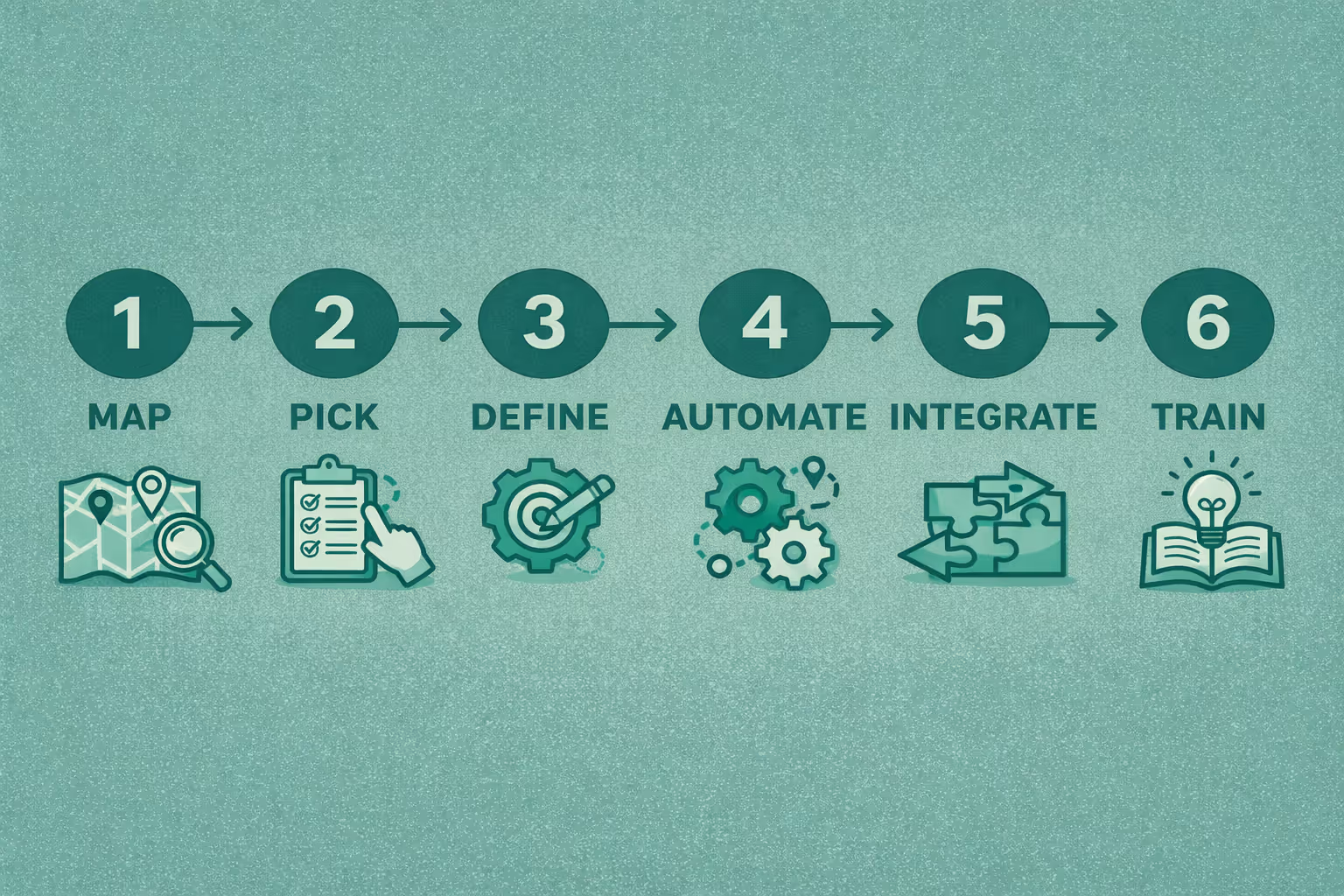
Map the current process (value stream): Chart out the customer journey, list out repetitive tasks and sales handoffs.
Pick one use case: For example, ‘Speed-to-lead for inbound forms’ or ‘Trial-to-paid onboarding.’ Fix that first.
Define business rules & SLAs: Who will own a lead after its capture? What will be the response time? Remember, faster contact = higher conversions.
Automate the flow in CRM: design workflow using triggers, auto-assign, templates, scheduled follow-ups, and lead scoring and test it in the staging area.
Superleap’s AI-assisted workflow templates can accelerate this setup with pre-built triggers and sequences.
Integrate critical systems: Connect your website forms, ad platforms, calendar, billing and support tools to avoid manual work.
Train users & set monitoring: A quick training + a daily dashboard for the first 30 days ensures adoption.
Note: Start small, test automation on one use case before scaling across departments.
Automating one process at a time creates visible wins and encourages team adoption.
Best practices for business automation using CRM
Start small and scale: Do not try to automate everything at once. Start with one workflow, let’s say - follow-up reminders. Once this runs smoothly, you can add more gradually.
Personalize all communications: Even automated messages must feel human. Insert company names, name of person whom you’re writing to so messages are relevant.
With Superleap, you can send tailored messages and engage in personable conversations.
Maintain data hygiene: Always update your data and eliminate duplicates. Ensure that fields like status, stage, or territory are accurate so workflows fire correctly.
Train your team: Get sales, marketing, and support teams involved early. Train them on new automated processes so they understand the “why” and “how.” This reduces resistance and helps everyone adopt the new system.
The human factor: Use bots to be more human
The irony of business automation is that it makes your company more human, not less. By automating the "robotic" tasks (data entry, scheduling, follow-ups), you give your team the breathing room to do what AI cannot: build real relationships.
A salesperson who spends 30 minutes after every customer call copying notes, updating fields, creating follow-up tasks, and scheduling reminders has less time available for the customer itself. If those administrative steps can happen automatically, the salesperson can spend that time on discovery, negotiation, and relationship building.
In that sense, good automation does not replace the human part of the workflow. It protects it.


.avif)
%201%20(1).svg)
.svg)
.svg)
.svg)
.svg)